

| HDMI 1.4 max resolution | 4K at 30fps (HDMI Forum specification) |
| HDMI 2.0 max resolution | 4K at 60fps with HDR (HDMI Forum specification) |
| HDMI 2.1 max resolution | 10K; practical max 4K at 120fps or 8K at 60fps (HDMI Forum specification) |
| HDMI 2.1 bandwidth | 48 Gbps (HDMI Forum specification) |
| Cable needed for HDMI 2.1 | Ultra High Speed HDMI (48Gbps certified) |
| eARC introduced in | HDMI 2.1 specification (HDMI Forum) |
The Short Answer: HDMI Versions Control What Your Gear Can Do Together
HDMI — which stands for High-Definition Multimedia Interface — carries both video and audio through a single cable. Simple enough. But the version of HDMI built into your device determines how much data that connection can move, which directly affects picture quality, frame rate, and audio features.
Think of it like a pipe: newer versions are wider pipes, capable of carrying more information at once. If your TV has HDMI 2.1 but your cable box only supports HDMI 2.0, you're limited to what the older device can send. Both ends of the connection matter.
For a broader look at how ports differ across devices, see our guide to every port on your laptop.
| HDMI 1.4 max resolution | 4K at 30fps (HDMI Forum specification) |
| HDMI 2.0 max resolution | 4K at 60fps with HDR (HDMI Forum specification) |
| HDMI 2.1 max resolution | 10K; practical max 4K at 120fps or 8K at 60fps (HDMI Forum specification) |
| HDMI 2.1 bandwidth | 48 Gbps (HDMI Forum specification) |
| Cable needed for HDMI 2.1 | Ultra High Speed HDMI (48Gbps certified) |
| eARC introduced in | HDMI 2.1 specification (HDMI Forum) |
HDMI 1.4, 2.0, and 2.1: What Each Version Actually Supports
HDMI 1.4 — still found on older TVs, projectors, and monitors — supports 1080p and basic 4K video, but only at 30 frames per second. It handles standard stereo and surround sound just fine, but it hits a ceiling quickly with modern content.
HDMI 2.0 increased bandwidth significantly, enabling true 4K at 60 frames per second and support for HDR (High Dynamic Range) content. This version covered most home theater needs through the mid-2010s and is still common on devices sold today. If your setup involves a 4K Blu-ray player or a streaming device pushing HDR content, HDMI 2.0 is generally sufficient — provided your TV can also accept it. To understand how resolution connects to picture quality, our TV resolution explainer covers the key tradeoffs.
HDMI 2.1 is the current standard and a meaningful jump. It supports 4K at up to 120fps, 8K at 60fps, and introduces features like Variable Refresh Rate (VRR) and Auto Low Latency Mode (ALLM) — both relevant primarily for gaming. It also doubles down on audio improvements through eARC (more on that below). If you're connecting a current-generation gaming console or planning an 8K setup, HDMI 2.1 ports become genuinely important.
ARC and eARC: The Audio Return Channel Explained
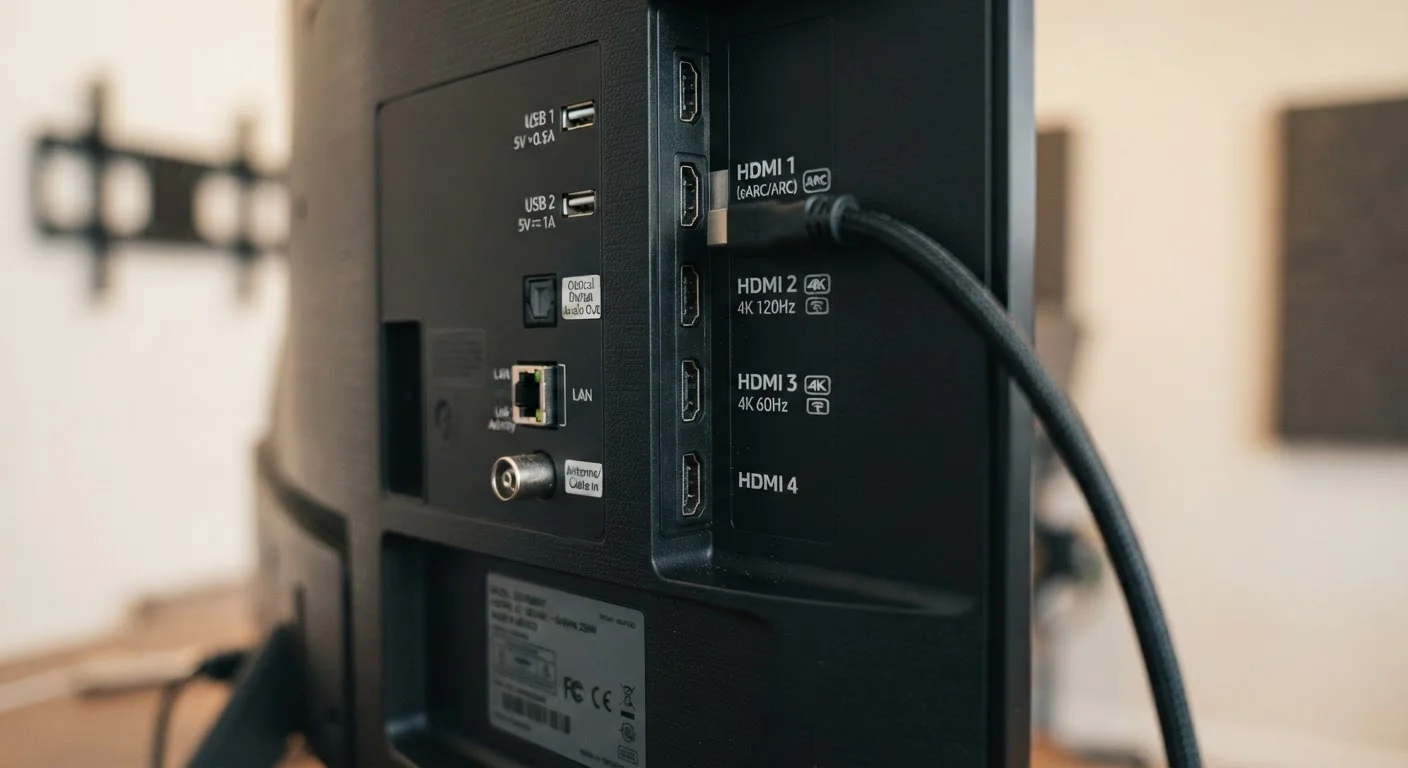
You'll notice that one HDMI port on most TVs is labeled ARC or eARC. These designations are about audio — specifically, sending sound from your TV back to a soundbar or AV receiver, rather than just receiving it.
Without ARC, you'd need a separate cable to get your TV's audio (like from a built-in streaming app) into your sound system. ARC solves that by making the HDMI cable a two-way audio channel.
eARC (Enhanced ARC), introduced with HDMI 2.1, dramatically increases the audio bandwidth. It supports lossless formats like Dolby TrueHD and DTS-HD Master Audio — the formats found on high-quality Blu-ray discs. Standard ARC can only pass compressed audio, which is fine for most streaming but falls short of the best available quality.
Practically: if you have a soundbar or receiver that supports eARC, plug it into the eARC-labeled port on your TV and use a high-speed HDMI cable to take full advantage. Our home audio connection guide explains how these formats fit into a full home audio setup.
Does Your Cable Actually Matter?
Here's something that trips people up: the physical HDMI cable doesn't have a version number. Cables are categorized by speed — Standard, High Speed, and Ultra High Speed. A cable that isn't rated for Ultra High Speed will act as a bottleneck even if your TV and source device both support HDMI 2.1.
Look for cables labeled Ultra High Speed HDMI (certified for 48Gbps) if you're using HDMI 2.1 features. For HDMI 2.0 setups, a High Speed cable is sufficient. Cable length can also matter — very long cables may require active signal boosting to maintain quality.
Cables don't need to be expensive, but they do need to match your setup's requirements. An uncertified cable could limit your picture or cause intermittent drops even when everything else is connected correctly.
If you're adding a streaming device to the mix, it's worth understanding how those connect to your TV's HDMI ports as well — our streaming sticks vs. smart TV breakdown explains what to expect.
Bandwidth
The maximum amount of data an HDMI connection can transfer per second, measured in gigabits per second (Gbps). Higher bandwidth supports higher resolutions and frame rates.
HDR (High Dynamic Range)
A video technology that expands the range of brightness and color in an image, producing more realistic highlights and shadows. Requires both the source device and display to support it.
ARC (Audio Return Channel)
An HDMI feature that allows audio to travel from your TV back to a connected soundbar or receiver over the same HDMI cable, eliminating the need for a separate audio cable.
eARC (Enhanced Audio Return Channel)
An upgraded version of ARC introduced with HDMI 2.1 that supports lossless, high-quality audio formats like Dolby TrueHD and DTS-HD Master Audio.
VRR (Variable Refresh Rate)
An HDMI 2.1 feature that allows the display's refresh rate to sync dynamically with the output of a gaming console or PC, reducing screen tearing and stuttering.
ALLM (Auto Low Latency Mode)
An HDMI 2.1 feature that automatically switches a TV into its lowest-latency picture mode when a game is detected, without requiring manual input.